AI-generated answers are quickly becoming one of the primary ways people discover information online. Instead of clicking through a list of links, users increasingly receive synthesized responses that draw from multiple sources across the web. Visibility has become less about ranking in search results and more about whether your content is used to shape the answer itself.
Today, most teams are still measuring SEO the same way they always have—rankings, impressions, clicks—while the reality is that discovery is shifting underneath them. And very few platforms give you visibility into how your content shows up in AI-driven experiences. That means you could be investing heavily in content, ranking well in search, and still missing out on visibility if your content isn’t being used in AI-generated answers.
Citations in Microsoft Clarity helps bridge that gap by showing how your content appears in AI-generated answers. It surfaces when your pages are discovered, referenced, and used as sources in grounding: the process AI systems use to retrieve relevant content before generating responses.
For example, imagine a customer asking an AI assistant, “What’s the best skincare routine for sensitive skin?” If your content isn’t being cited in that answer, even if you rank #1 in search, you’re effectively invisible in that moment of discovery. Citations helps you understand when that happens and where you have opportunities to show up.
When we introduced Citations in preview, the goal was to help publishers and brands understand how their content appears in AI-generated answers. The preview gave early users visibility into when and where their content was being cited across supported AI experiences.
Feedback from the preview helped refine how these signals are measured, aggregated, and presented. Publishers and brands wanted clearer ways to interpret citation patterns across queries, pages, and overall visibility trends, leading to a number of updates to the reporting experience and underlying metrics.
With this release, Citations in Microsoft Clarity moves into general availability with those refinements incorporated into the product. The core goal remains unchanged: helping site owners better understand how their content participates in AI-generated experiences and how that visibility evolves over time.
What Does the Citation Dashboard Measure?
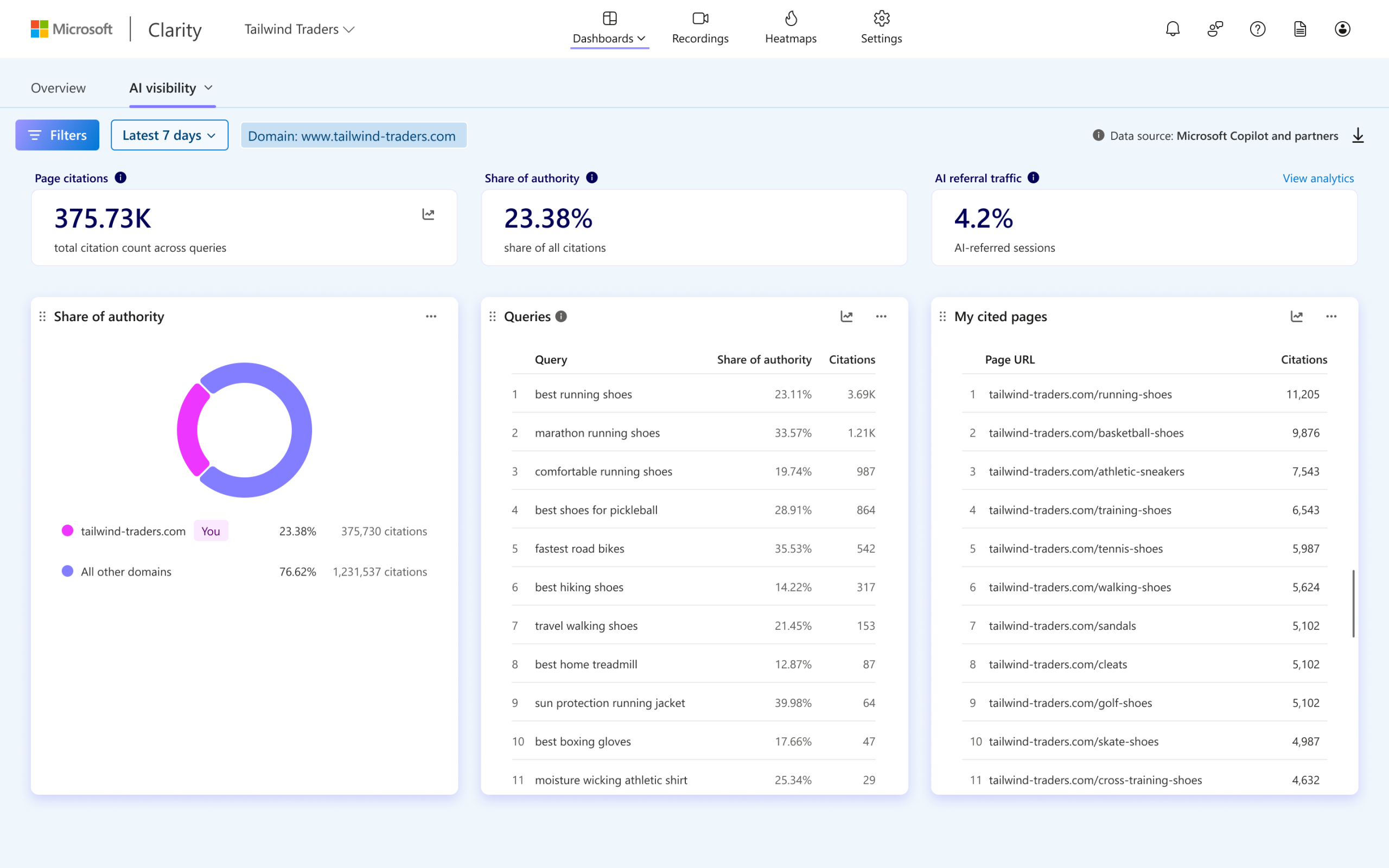
The Citation dashboard shows how your content is referenced in AI-generated answers across supported AI experiences by summarizing and aggregating citation activity across the following areas:
- Page citations: The total number of times pages from your domain were referenced in AI-generated answers during the selected time period, including multiple citations within the same answer.
- Share of authority: A competitive view showing the percentage of total citations attributed to your domain compared to other cited domains within the same set of queries where your domain appeared.
- AI referral traffic: The percentage of sessions on your site originating from AI assistants during the selected time period, calculated as AI-referred sessions divided by total sessions.
- Queries: The queries used by AI systems to retrieve and evaluate your content before generating an answer, helping you understand how AI systems interpret user intent and connect it to your content.
- My cited pages: A page-level view showing which URLs from your domain were cited in AI-generated answers, along with citation counts and associated grounding queries. This helps identify which content is most frequently selected as a trusted source by AI systems.
- Trendlines: With trendlines for cited pages and queries, you can analyze how activity changes over time as content evolves and AI query patterns shift.
Additional updates to this feature include the reporting model, query views, filtering, and pagination to improve performance across larger datasets and longer time ranges while creating a more streamlined visibility analysis experience.
Getting Started
Citations is now generally available for Microsoft Clarity projects.
To get started, create a Clarity project and install the Clarity tracking code on your site. Once enabled, the Citations dashboard begins surfacing visibility insights automatically, including grounding queries, cited pages, share of authority, and AI-referred traffic trends.
In some cases, domain ownership verification may be required before citation reporting becomes available. This can be completed by connecting either Bing Webmaster Tools or Google Search Console to your Clarity project.
For Clarity projects associated with multiple domains, a single domain must be selected during setup for Citations reporting. Support for changing the selected domain after setup is not yet available.
The dashboard can be accessed in Microsoft Clarity under:
Dashboards → AI Visibility → Citations
For publishers and brands, this provides a centralized view into how content is being discovered, cited, and represented across AI-generated experiences over time.
👉 Visit the documentation page to learn more.
Looking Ahead
Microsoft Clarity will continue expanding Citations with additional insights to give businesses deeper visibility into how their content is discovered, interpreted, and used in AI-generated answers. Upcoming capabilities will introduce topic insights, which automatically groups cited queries into intent-driven themes to help teams better understand not just what content is being surfaced, but why, and in what context AI systems are selecting it.
These insights provide richer competitive and attribution analysis, helping site owners understand where their content appears and how strongly it contributes to AI-generated responses relative to other sources. With this, teams can get clear, actionable recommendations to fill content gaps, build authority across key topics, and appear more often in AI answers that drive demand.
These capabilities are launching soon. Stay tuned.