
July brought a powerful lineup of feature updates to Microsoft Clarity—designed to help you uncover insights faster, streamline your workflow, and get more out of every session.
From AI-generated campaign summaries to mobile access for visitor profiles, there’s something new for every team.
Here’s a full rundown of what launched in July.
Introducing Trends: See the Big Picture
In the past, data in Clarity was presented as static data points. Now, you can use the new trends feature to see the bigger picture. Spotting long-term trends helps you catch early signals, measure the impact of product updates, and make informed decisions with confidence.
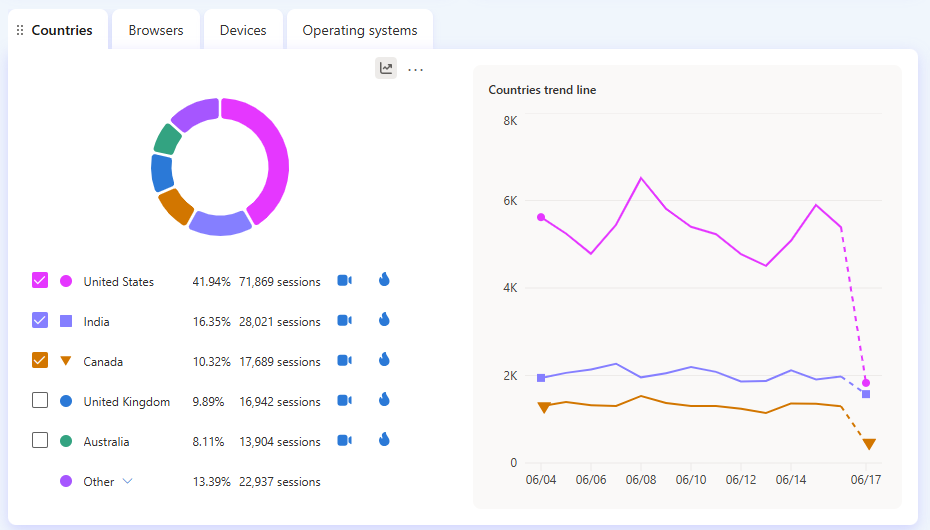
Whether you’re tracking a spike in user engagement or diagnosing a sudden drop-off, visualizing trends gives you the context you need to take action.
➡️Read the full announcement here.
Improved Grouped Session Insights: Summarize 25x More Recordings
Clarity’s grouped session insights just got a major upgrade—now supporting summaries of up to 250 session recordings (up from 10). This feature uses AI to analyze clusters of user sessions and generate concise, actionable summaries that highlight common behaviors, pain points, and trends.
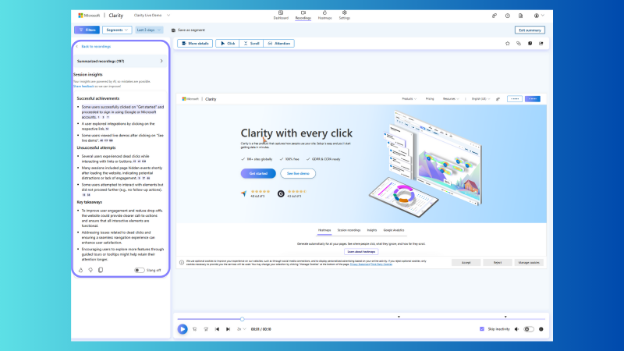
With this update, you can:
- Summarize large volumes of session recordings in seconds.
- Filter by device type, country, or campaign to tailor insights.
- Spot usability issues like rage clicks or dead zones faster.
- Share AI-generated summaries across product, UX, and marketing teams.
It’s a leap forward in making session replay data not just watchable—but truly insightful. Try it out in your Clarity dashboard today. You can also read our step-by-step guide to learn more.
Clarity for Shopify: Optimize Every Step of the Ecommerce Funnel
The new Clarity Shopify App gives store owners a powerful way to visualize and improve the customer journey—from product page to thank you page. With heatmaps, session recordings, and Smart Events built in, you’ll see exactly where shoppers engage, hesitate, or drop off.
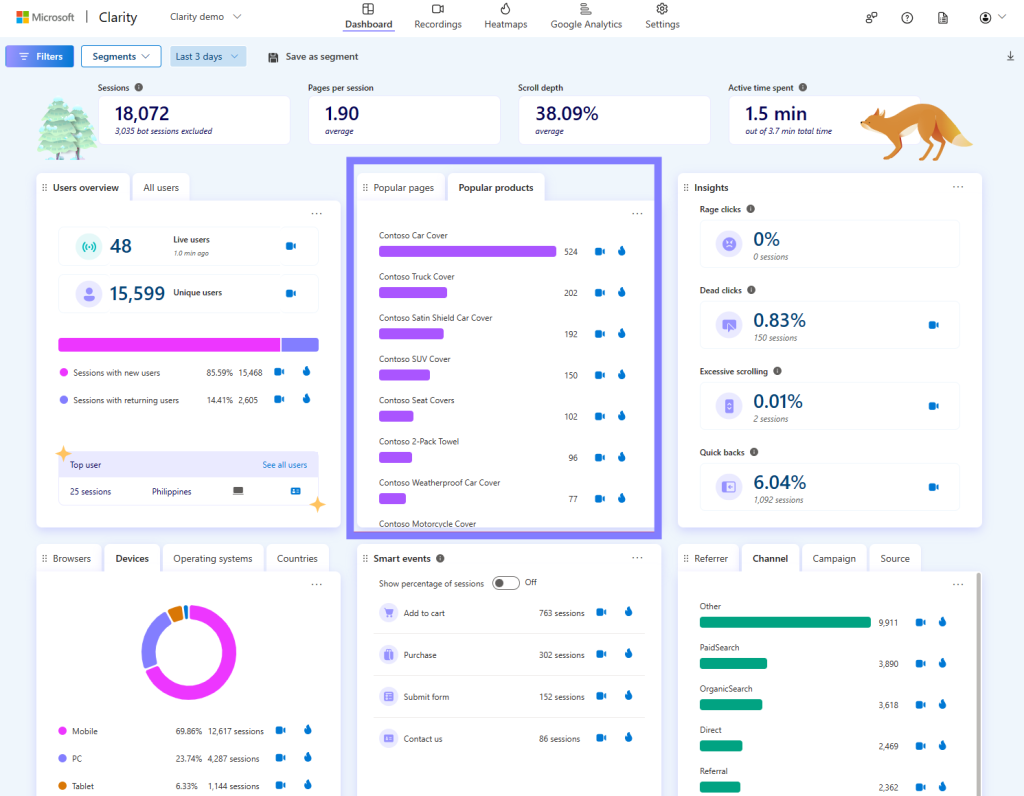
With Clarity for Shopify, you can:
- Track checkout behavior and post-purchase engagement.
- Visualize conversion funnels with ecommerce-specific heatmaps.
- Spot friction points on mobile and desktop.
- Improve ad spend by analyzing traffic quality and landing page performance.
- Make data-backed UX and CRO decisions with zero setup.
➡️ Install Clarity for Shopify and start optimizing in minutes. You can also read the full announcement here.
Insights for Microsoft Ads: Analyze Your Campaigns with AI
Clarity is upgrading its support for Microsoft Ads campaigns. Now, you can use AI to generate campaign insights—bringing the same intelligent summaries you’ve seen for Google Ads to your Microsoft campaigns.
This new feature makes it easier to:
- Quickly understand how each Microsoft Ads campaign is performing.
- Surface key trends and anomalies with AI-generated summaries.
- Identify high-performing traffic and uncover drop-off points faster.
- Get actionable takeaways without manual deep-dives into session data.
➡️ Visit the Clarity dashboard and view your campaign data to start generating insights.
UserFeedback Integration: Turn User Behavior Into Actionable Insights
Microsoft Clarity and UserFeedback now work together to give WordPress users a complete picture of the user experience. Clarity shows you how visitors behave with heatmaps and session replays, while UserFeedback captures direct input with customizable surveys. Together, they reveal both what’s happening on your site—and why.
With Clarity and UserFeedback, you can:
- Identify UX issues with scroll depth, rage clicks, and session recordings.
- Capture targeted, on-site feedback with surveys in real time.
- Match user frustration to specific site behaviors for faster fixes.
- Validate design or content changes with direct responses and behavior data.
- Pinpoint root causes behind vague complaints or confusing interactions.
➡️ Start using Clarity and UserFeedback to uncover actionable insights in minutes. You can also read the full announcement here.
Clarity for WordPress: Now Even Easier to Use
Instant setup. Deeper insights. No extra tabs. Our plugin for WordPress just got a major upgrade. With heatmaps, session replays, and engagement metrics built in, Clarity helps you understand what’s working and fix what’s not. And now, it’s fully embedded into your WordPress workflow with faster setup and no friction.
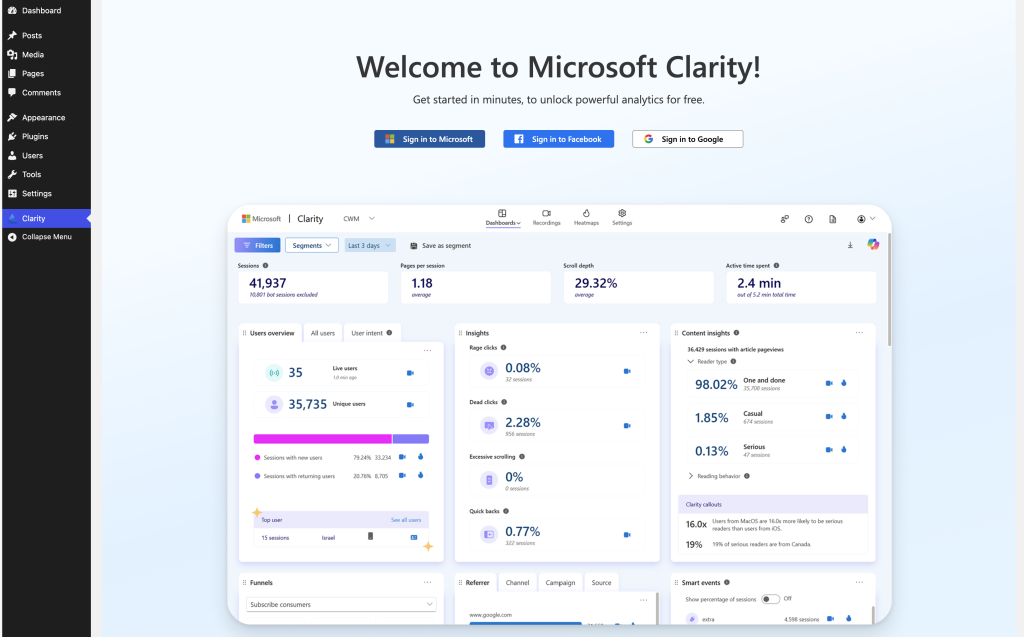
With the latest update, you can:
- Automatically create a Clarity project when you activate the plugin.
- Sign in with Microsoft, Google, or Facebook without leaving WordPress.
- Instantly link existing projects via dropdown.
- Access your full Clarity dashboard—heatmaps, sessions, and more—right from the WordPress admin panel.
➡️ Install or update the Clarity plugin and start uncovering real user behavior in minutes.
Event Type Filtering: Find Key Moments in Session Recordings Faster
Session recordings just got easier to navigate. Now, within any individual recording, you can filter the event timeline by event type—so you can quickly zero in on the moments that matter.
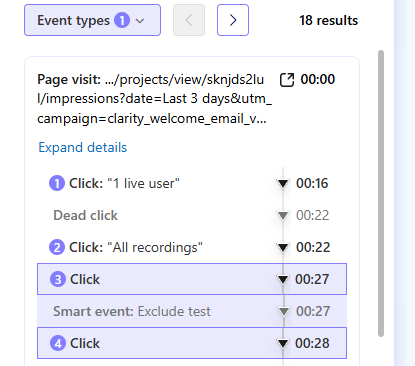
To use it, click More Details on a recording to open the event timeline. You’ll see a breakdown of all actions and events across the session—like clicks, scrolls, and Smart Events. With the new filtering option, you can:
- Focus only on Smart Events, rage clicks, or other key interactions.
- Cut through noise in long recordings.
- Jump straight to relevant moments without watching the entire session.
This update helps streamline analysis, especially when dealing with high-volume traffic or complex user flows.
Visitor Profiles Now Available on Mobile
You can now access visitor profiles directly from your phone. This update brings a key desktop feature to the mobile Clarity experience—making it easier to analyze user behavior on the go.
Visitor profiles let you:
- View a unique Clarity ID for each user.
- See all sessions tied to that visitor across your site.
- Explore key events and interactions across multiple visits.
➡️ Learn more about visitor profiles in our Support Center.
Conclusion
July was all about making insights more accessible, analysis more efficient, and behavior data more actionable, all while introducing integrations with key website tools.
Whether you’re refining ad campaigns, optimizing ecommerce flows, or exploring Clarity on the go, these updates are here to help you move faster and smarter. Stay tuned—more is on the way in August!