Netpeak & ON Clinic

Netpeak & ON Clinic

How Netpeak Increased Healthcare Conversions by 25% with Microsoft Clarity

When ON Clinic wanted to make it easier for patients to book appointments and access medical services online, they partnered with Netpeak to optimize their website’s user experience. By leveraging Microsoft Clarity to understand real user behavior, the team uncovered hidden friction, improved navigation, and redesigned key pages — resulting in a measurable boost in conversions for appointment bookings, calls, and requests. 

About Netpeak & ON Clinic 

Netpeak is Ukraine’s leading digital marketing agency, helping mid-sized and enterprise brands scale through data-driven strategies and exceptional user experiences. With clients like PUMA, OLX, Uklon, COMFY, Kyivstar, and Intertop, Netpeak combines technical expertise with actionable insights to deliver measurable results.

ON Clinic operates a network of medical centers across more than 10 Ukrainian cities, providing diagnostic, treatment, and preventive healthcare services. Their goal is to make medical care accessible, transparent, and convenient — both in-person and online. 

The Challenge 

ON Clinic sought to increase the conversion rate from website visits to key actions, including appointment bookings, phone calls, and service requests. 

Although high-level analytics highlighted some drop-offs in the patient journey, the reasons behind them remained unclear. Netpeak identified several challenges: 

  • Unclear navigation and conversion paths on service pages, medical center pages, and the homepage. 
  • Mobile usability issues, including buttons and interactive elements that did not meet recommended touch area guidelines. 
  • Ineffective promotional banners and content layouts that didn’t guide users toward action. 
  • User confusion around clinic locations and doctor browsing, limiting exploration of available services. 

To address these challenges, Netpeak needed detailed, session-level behavioral insights — something traditional analytics tools could not provide. 

The Solution 

Netpeak implemented Microsoft Clarity on ON Clinic’s website to gain a deep understanding of user interactions. Through session recordings, heatmaps, and scroll maps, the team was able to: 

  • Watch recordings of patient sessions from first visit to appointment booking. 
  • Identify friction points and usability issues, including non-clickable elements, confusing navigation, and sections with too much content. 
  • Measure engagement with promotional banners, forms, and service information. 

“Using heatmaps and scroll maps in Clarity, we analyzed user behavior and identified the specific pages with the highest level of interaction to determine optimization priorities,” said Artem Diachenko, Marketing Specialist at Netpeak.” 

What They Changed 

Based on Clarity insights, Netpeak implemented a series of UX and CRO improvements on priority pages: 

1. Homepage 

Netpeak clarity heatmap

Slider and Call-to-Action Optimization: Removed duplicate “Book” buttons and enabled banner clicks to improve usability and mobile accessibility. 

Scroll Distribution: Moved text blocks lower to prevent content overload and encourage users to explore the full page. 

Simplified Locations Block: Showed only city names for faster navigation and reduced scanning time. 

2. Service Pages 

  • Integrated Booking Links: Added clickable phone numbers and contact forms directly within service descriptions to make conversion points immediately accessible. 
  • Interactive Banner Updates: Added pagination dots to promotional banners to indicate interactivity and improve engagement. 

3. Medical Center Pages 

  • Clickable Elements: Redesigned informational blocks (e.g., 24/7 support, in-house labs) so users can access relevant details. 
  • Map Functionality: Enabled address links to open maps directly, helping users locate clinics. 
  • District Clarification: Added specific district names (e.g., “Odesa (Tairova)”) to reduce confusion for unfamiliar users. 
  • Doctor Browsing Pagination: Improved horizontal scrolling with clear pagination indicators, helping users track available profiles. 

The Results 

Netpeak’s systematic, data-driven approach yielded substantial improvements across ON Clinic’s website. 

ON Clinic saw a 25.1% increase in homepage conversions, with more visitors moving from landing on the site to taking action. Service page conversions rose by 26.3%, driven by clearer calls to action and in-text links that made it easier for patients to request appointments. The largest increase came from medical center pages, where conversions jumped by 78.9% thanks to improved location clarity that helped patients confidently choose the right clinic. 

Conclusion 

By combining Microsoft Clarity’s behavioral insights with Netpeak’s UX and CRO expertise, ON Clinic significantly increased appointment bookings, calls, and service requests across its network. 

Netpeak’s data-driven approach also demonstrated that thoughtful UX optimization is not just a design exercise — it’s a business lever that directly impacts user engagement and business performance. 

“Clarity allowed us to see real user scenarios, uncover subtle interaction barriers, and understand how visitors make decisions on the website,” said Diachenko. “Today, Clarity analytics has become an integral part of our continuous improvement process across all projects.”

instacar

instacar

How instacar Used Microsoft Clarity to Streamline Digital Leasing and Increase Conversions   

When instacar set out to modernize vehicle leasing in Greece, they needed visibility into every step of the customer journey. By using Microsoft Clarity to understand real user behavior, the team uncovered hidden friction, improved usability, and boosted conversions across web and mobile. 

About instacar 

Launched in 2019 by Antonis Samothrakis and Antonis Zois, instacar is redefining how people and businesses in Greece access vehicles. What started as a vision to modernize the rigid leasing industry has evolved into a fully digital mobility platform — one that combines flexibility, transparency, and customer-first design. 

Today, instacar offers a seamless digital leasing experience for both individuals and small-to-medium businesses. Through its website, mobile app, and internal fleet management system, customers can lease, buy, or manage vehicles end-to-end — from selecting a car to signing, uploading financial documents, and scheduling delivery. 

As the platform expanded, so did its need to ensure every digital interaction — from quote requests to document uploads — was intuitive, fast, and reliable. 

To solve this problem, Dimosthenis Avgeris, Head of Product at instacar, decided to dig deeper than surface-level metrics and understand each of these user interactions.   

The Challenge 

instacar’s booking process is the heartbeat of its business. The journey involves multiple critical steps, including requesting a leasing quote, uploading financial documents, completing payments, and finally confirming delivery. 

But while high-level analytics tools showed drop-offs within the flow, the why behind them remained unclear. 

“Users often dropped off or made errors, but it wasn’t clear at which step or why,” said Avgeris. “Since most of our traffic is mobile, we needed to be sure the flow was robust on all device types and screen sizes—something that wasn’t visible with numbers alone.” 

The team faced several challenges: 

  • Unclear drop-off points in the quote and document upload flow. 
  • Mobile usability issues, with CSS or UI inconsistencies affecting experience on certain devices. 
  • Friction in exploration, as users navigated car listings, filters, and pricing tools. 
  • Limited visibility into how users understood the platform’s unique selling points or handled complex interactions like financial form uploads. 

Traditional tools like Google Analytics provided aggregate data but lacked the session-level insight needed to identify and fix specific moments of confusion or frustration. 

That’s where Clarity came in. 

The Solution 

To bridge that gap, instacar implemented Microsoft Clarity across both its website and mobile app. 

With Clarity’s session recordingsheatmaps, and smart events, the team gained the visibility they needed to: 

  • Watch real user sessions end-to-end. 
  • Detect rage clicks, slow load times, and usability issues. 
  • Track engagement with key elements like filters, forms, and galleries. 

“Monitoring the full funnel with Clarity meant we could quickly detect where users experienced delays, confusion, or technical difficulties, and make targeted improvements,” Avgeris explained.

By combining Clarity’s qualitative insights with quantitative metrics, instacar’s product, engineering, and marketing teams could prioritize high-value fixes and move quickly from insight to action. 

What They Changed 

Using insights from Microsoft Clarity, instacar launched a series of data-driven UX and performance improvements across its booking flow and website: 

1. Smart Filters for Car Discovery 

  • Redesigned the car listing filters to be more intuitive and mobile-friendly. 
  • Made the entire filter row clickable instead of just the checkbox, reducing frustration and improving the speed of product exploration. 
instacar smart filters before and after comparison

2. Pagination Implementation 

Added pagination to long lists of cars, improving page performance, and making it easier for users to navigate listings without feeling overwhelmed. 

3. Car Gallery Redesign 

  • Revamped the car image viewing experience with an enhanced gallery and mobile navigation. 
  • Added zoomable images and easier swipe functionality to make browsing vehicle details smoother and more engaging. 

4. Streamlined Financial Form & Document Uploads 

  • Redesigned the multi-step quote and financial data collection process. 
  • Simplified document upload screens with clear CTAs, error handling, and guidance to reduce user confusion. 
  • Ensured the flow worked seamlessly across devices and screen sizes. 

5. Fully Digital “Add Driver” Feature 

before and after comparison of instacar add drivers page
  • Transformed a previously manual, pre-delivery process into a self-service flow accessible in both app and web experiences. 
  • Enabled subscription owners to invite additional drivers by email, with invitees completing the process digitally. 
  • Incorporated clear CTAs, required uploads, and in-flow error messaging for better guidance. 

6. Marketing Campaign Visibility 

  • Redesigned promotional elements on the car page and car list experiences to reduce cognitive load and highlight active campaigns more effectively. 
  • Reorganized sections like “Similar Cars” to improve product discovery and encourage exploration. 

7. Overall Usability & Friction Reduction 

  • Addressed UI inconsistencies and device-specific issues identified in Clarity session recordings. 
  • Optimized interactive elements to reduce frustration, such as rage clicks on filters or gallery navigation. 
  • Implemented small but meaningful UX tweaks across the booking flow, vehicle listings, and post-quote actions. 

The Results 

The cumulative effect of Clarity-driven improvements was significant: 

Performance & Stability 

28% decrease in average page load time  25% reduction in rage clicks from slow-loading content   14% decrease in mobile session abandonment   

User Experience & Engagement 

17% increase in image interaction rates  13% increase to user engagement times  21% increase in user engagement with the pricing filter 
26% increase in filter-driven searches  18% more cars viewed per user session  90% reduction in rage clicks on filters 

Conversion & Funnel Progression 

7% increase in conversions  49% increase in post-quote form completion rates   15% increase in form submission rates for cars featured in active campaigns 
61% increase in add driver completion rates  100%+ increase in add driver interactions   

Support & Operational Efficiency 

12% reduction in customer support inquiries  57% reduction in customer support calls for requests to add drivers  Reduced manual processing time by streamlining credit workflows 

These enhancements not only improved conversion rates and reduced support workload but also created a smoother, more intuitive digital experience that strengthened user trust. 

“Microsoft Clarity proved invaluable by offering detailed, real-time insights into user behavior that traditional analytics overlook,” said Avgeris. “It revealed precise pain points, unexpected user paths, and areas of friction across our site, enabling us to prioritize fixes based on actual user struggles rather than assumptions.” 

Conclusion 

For instacar, Clarity has become more than a UX optimization tool; it’s an integral part of their product development process. By combining behavioral data with experimentation and cross-team collaboration, the company continues to refine its digital experience and accelerate growth. 

“Clarity helped us see exactly how users interact with our website, app & internal fleet management tool, highlighting frustrations and showing us where to focus our efforts,” said Avgeris. “Clarity is now part of how we make ongoing improvements, with decisions grounded in what users actually do, not just what we assume.” 

By keeping the customer’s real journey at the center, and using Clarity to illuminate it, instacar continues to deliver on its mission: making modern mobility simple, flexible, and digital for everyone in Greece. 

Love using Clarity? Share your success story with us! 

AllEvents

AllEvents

How AllEvents Uses Microsoft Clarity to Optimize Experiences for 20M+ Users 

When rapid growth revealed hidden friction in their digital experiences, AllEvents turned to Microsoft Clarity to uncover the “why” behind user behavior — turning insights into impactful product decisions. 

About AllEvents 

AllEvents is an online platform that helps users discover events, activities, and things to do in cities around the world. It was founded in 2011 by Amit Panchal and Ruchit Patel with a simple but ambitious mission: to make event discovery effortless. 

Over the years, the platform has grown into a global product operating in more than 20 countries, connecting over 20 million users with events they care about. Its mobile app has surpassed 2 million downloads — becoming a go-to solution for people looking to explore what’s happening nearby. 

But as AllEvents expanded its reach, new challenges began to emerge — especially when it came to optimizing user experience at scale. 

To solve this problem, Paras Makhija, the B2C growth strategist at AllEvents, decided to dig deeper than surface-level metrics and see what was really going on. 

The Challenge 

AllEvents’ rapid growth brought scale — but it also brought complexity. With over 10 million active users across both web and mobile platforms, understanding how users actually interact with the product became increasingly difficult. 

As the team rolled out new features, they found they could measure what users were doing, but not why they were doing it. This made it hard to validate features, understand drop-offs, or learn what was working — especially with such a large and diverse global audience. 

“We needed to know: Were users finding value? Where were they struggling? What was going unseen?”

Paras Makhija, B2C Growth Strategist, AllEvents

Several pain points stood out: 

  • High bounce rates on the website: Many users were dropping off within the first 10 seconds — even on landing pages that were highly targeted and strategically designed to convert. 
  • App homepage drop-offs: Many users weren’t progressing beyond the app’s homepage. They weren’t tapping into event categories, listings, or recommendations. This raised a red flag about potential issues with discoverability or relevance. 
  • Low engagement during A/B testing: Features the team believed would increase engagement — such as new navigation elements or CTAs — sometimes produced ambiguous or underwhelming results. 

Traditional analytics tools, with metrics like page views and bounce rates, were able to highlight what was happening on the surface. But with a global user base spanning a wide range of behaviors, cultures, and preferences, Makhija and his team needed something that could go deeper — helping them see the real reasons behind user behavior. 

That’s when they adopted Microsoft Clarity. 

The Solution 

AllEvents integrated Microsoft Clarity into their website and used the Clarity Flutter SDK to bring the same behavioral insights into their mobile app. This allowed the team to capture a unified view of user interactions across both platforms.

Clarity quickly became central to AllEvents’ product decision-making process. Its session recordingsheatmaps, and insights gave the team a clearer view into the user journey — allowing them to validate hypotheses, identify friction points, and build with more confidence. 

“We needed to see things from the user’s perspective — clicks, hesitations, rage taps, scroll depth — all within context. That’s where Clarity’s visual insights changed the game,” said Makhija. 

With Clarity, the team was able to uncover several key insights that challenged their assumptions and led to real product improvements. 

On the Website 

  • Heatmaps and recordings exposed unexpected user behavior: Users were consistently attempting to click on or download event banners — even though these weren’t designed to be interactive. This suggested untapped engagement potential. 
  • The “View Map” feature emerged as surprisingly important: While the team initially believed the event map was rarely used, Clarity showed it was actually one of the most clicked elements on the page. This insight flipped internal assumptions and showed the potential for a more prominent map experience. 

In the Mobile App 

  • Session recordings revealed confusion and disorientation: Users scrolled the mobile homepage with hesitation, missed key CTAs, and bounced quickly. What initially looked like a content problem turned out to be an issue of personalization. 
  • The homepage lacked relevance for both new and returning users: Without contextual or personalized content, users didn’t feel guided or engaged. Clarity helped the team recognize this as a major opportunity for improvement. 

Across Global Markets 

  • Geo-specific behavioral analysis uncovered cultural UX differences: With users in more than 20 countries, the team needed to understand how behaviors varied by region. Clarity enabled analysis of sessions tied to specific user IDs and geographic segments, allowing for localized hypotheses and region-specific design experiments. 

“Watching real users interact with our platform — in all their scrolls, pauses, rage taps, and exits — helped us identify friction points that numbers alone couldn’t surface.” 

Paras Makhija

What They Changed 
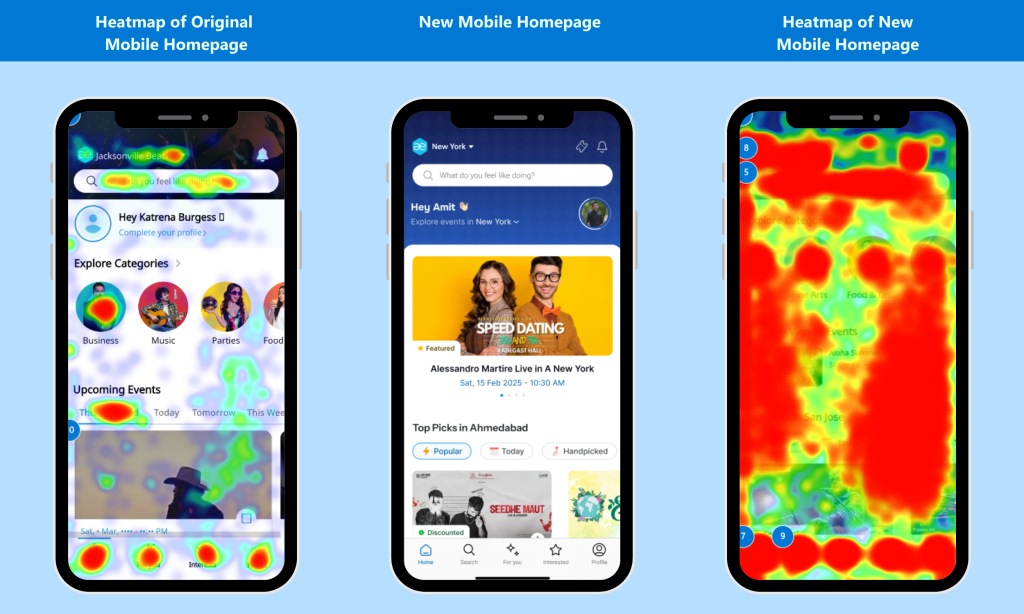
Clarity’s insights led AllEvents to make several high-impact changes across their digital experience: 

Event Banner Interaction Enhancements 

Heatmaps and session replays showed that the event banner on listing pages had the second-highest click volume — despite having no interactive features. This revealed a major missed opportunity. In response, the team: 

  • Enabled banner zoom/enlarge functionality. 
  • Allowed users to save, share, or RSVP directly from the banner. 

This small UX change led to a meaningful boost in engagement, with users actively sharing events — effectively turning each banner into a lightweight branding asset. 

Map Feature Optimization + New Revenue Stream 

Data from Clarity revealed that the “View Map” button was the third-most clicked element on event pages. Contrary to assumptions, users wanted to see — and interact with — event locations. The team responded by: 

  • Making the map more prominent. 
  • Adding contextual actions like RSVP and Share within the map view. 

They also took it one step further: when they noticed rising user interest in nearby accommodations, they integrated Stay22 Maps, allowing users to explore and book nearby hotels directly. This created a better experience for users and a brand-new, organic revenue stream for AllEvents. 

App Homepage Redesign & Personalization 

The session recordings made it clear that the app homepage wasn’t connecting with users. In particular, the lack of personalization was causing confusion and quick exits. 

To address this, AllEvents rolled out a complete homepage overhaul, with key new features: 

  • Dynamic greetings that change each time the app is opened. 
  • Happening Vibes — Instagram-style stories that highlight trending events. 
  • Top Picks For You — personalized suggestions based on user behavior. 
  • Social Discovery — tools to find events friends are attending. 

These features collectively added relevance, delight, and structure — giving users stronger reasons to engage and explore. 

The Results 

After implementing the changes informed by Clarity, AllEvents saw immediate, measurable improvements across both web and mobile. 

Website 

  • Over 10,000 event banner downloads in the first month after launch — transforming a static asset into a powerful tool for organic event promotion. 
  • The map interaction redesign led to increased engagement and enabled the Stay22 integration, opening a new monetization stream. 
  • The addition of a Share button contributed to 5% of all RSVPs. 
  • Overall RSVP conversions from event pages jumped by 10%. 

Mobile App 

  • Happening Vibes (Stories) generated 6,000+ views in just 15 days, increasing content discovery and session duration. 
  • Homepage-to-event navigation improved by 10%, strengthening a key user journey. 
  • User feedback reflected the impact — app reviews and ratings pointed to increased satisfaction and appreciation for the new, personalized experience. 

“Clarity helped bring our users’ experiences into focus, and we turned those learnings into product decisions that made our platform more engaging, more usable, and more loved.”  

Paras Makhija

Conclusion 

Clarity didn’t just help AllEvents identify product issues — it helped them uncover growth opportunities. It gave them a clear view into real user behavior and provided the insights needed to act quickly and effectively. For Makhija and the team, Clarity is now part of their daily workflow. 

“We don’t just check Clarity — we binge-watch it,” Makhija said. “It’s like Netflix for product people: every session tells a story, and every rage click is a plot twist. It’s simple, powerful, and honestly… kind of addictive.” 

By combining user empathy with hard data, AllEvents continues to grow as a global platform — delivering relevant, intuitive, and engaging experiences for millions of users around the world. 

Places for People

Places for People

How Places for People increased page views by 63% with Microsoft Clarity

How Places for People Revamped their Website to Increase Conversions and Engagement

Places for People is the UK’s leading social enterprise dedicated to changing lives by creating and supporting thriving communities. With a diverse portfolio, the company consists of market leaders in housing, regeneration, development, investment management, property management, and leisure services. Managing over 245,000 homes and operating 100 leisure facilities across the UK, Places for People provides homes and essential services to approximately 500,000 customers, supporting health and well-being through millions of visits each month. Beyond these services, their social impact programs address employment, homelessness prevention, health, finances, and well-being, delivering 334 million in value to communities in the last year. 

Learn how the changes implemented with Clarity’s help led to these significant improvements within the first month:

16.8% increase in page views across the entire Careers section

241% increase in views on the “Life at Places for People” page, driven by Clarity insights. 

63.8% increase in page views on the “Discover Your Career” webpage, showing a more complete user journey from landing on the site to applying for a vacancy. 

50% of users scrolling to the bottom of the Careers landing page, engaging with vital information about the company’s values. 

The Challenge

With multiple websites catering to various sectors and services, Places for People sought a deeper understanding of how their diverse audience interacted with these digital platforms. Each website had distinct goals: while the New Homes site focused on lead generation for development sales, the main website was designed to assist affordable housing customers in managing their accounts and accessing helpful information. The organization’s goal was to optimize user experience across all platforms, ensuring ease of access and a seamless digital journey. 

Previously, the team used Hotjar but lacked the resources to monitor heatmaps and clickmaps consistently. With a growing need for additional insights, they decided to switch to Microsoft Clarity, capitalizing on its more additional features while saving time and money. One of their primary focuses was the Careers section, which wasn’t effectively showcasing Places for People’s value to potential job applicants. The Talent Acquisition team wanted a more compelling and engaging experience for job seekers. 

The Solution: Microsoft Clarity

Clarity provided the team with a simple, visual way to explain the current performance of the Careers section to their stakeholders and allowed them to demonstrate the reasoning behind every design decision the team was making. It meant that they could visually show them that by having a button for “Current Vacancies” at the top of the page, 50% of users were clicking it and dropping off the page before they’d even read about Places for People or any of the reasons they would want to work here, which was an eye-opening statistic for everyone involved.

When digging further into the performance of these webpages they were able to get a really good idea of how user intent on these pages informed the effectiveness of different elements. A great example is the content slider seen below – this was a simple way to horizontally showcase information without increasing scroll depth significantly. However, they noticed that these were getting a lot of rage clicks, and people were gravitating towards the “View All Current Vacancies” button more. They determined that this was due to the intent of the user – someone who is visiting the page only to view information about working in their Leisure company is going to find it frustrating scrolling through content relevant to the housing or sales parts of the Group, and so they knew that the scroller couldn’t be used for content like this.

Clarity also highlighted some pages that were performing particularly well. The Life at Places for People page, where they house information about the social value they deliver, the rewards and benefits available to colleagues and their options for developing careers, had over 50% of users scrolling to the bottom of the page. This was great news for the Talent Acquisition team, but they knew that they could take this further and if people were interested in this information, then they could redesign the page to put more information in without impacting the amount of scrolling required.

Actions Taken

Every feature in Clarity was essential to this project. The heat and click maps not only allowed them to make informed design decisions but also meant they could communicate those in an impactful way to their stakeholders. The new Copilot feature was also really great for summarizing large amounts of data and providing actionable insights into how the previous Careers pages were performing.

As a result of the work with Clarity, Places for People completely revamped the entire Careers section. They tried to shorten page length where possible, however as it was clear that user intent was influencing engagement, they kept pages longer where we knew that they’d be read or added in quick menus to help account for the increased page length.

On the main Careers landing page they added a new, highly visual entry point to the site as this was the page they were optimizing for Google and they wanted the first impression to be striking. However, Clarity taught them that having a button to the current vacancies in the banner meant users skipped past all the other pages, so for launch they changed the button to nudge people towards “Life at Places for People” instead.

Below you can see some of the before/after shots:

Before

After

After

They added far more value to the main Careers landing page, including a new content slider for their People Promises so people can look through and see how their values align with Places for People. They felt this content was far more suitable for the slider as there was low user intent – users are simply browsing rather than trying to find something specific.

Below is the page users navigate to in order to start their career search. The previous page used the slider which meant more rage clicks as people were scrolling through trying to find something specific. The new grid layout gives a more visual and on-brand insight into each business area. This page does lengthen significantly on mobile and so we built in a quick menu at the top to allow the user to jump to specific parts of the page.

Before
After

Places for People intend to monitor the updates and make changes accordingly depending on engagement.

Results Overview

The changes implemented with Clarity’s help led to significant improvements within the first month: 

  • A 16.8% increase in page views across the entire Careers section. 
  • A 241% increase in views on the “Life at Places for People” page, driven by Clarity insights. Clarity also told them that the “Life at Places for People” button on the header of the main Careers page was the fourth most used element on the page.
  • A 63.8% increase in page views on the “Discover Your Career” webpage, showing a more complete user journey from landing on the site to applying for a vacancy. 
  • 50% of users scrolling to the bottom of the Careers landing page, engaging with vital information about the company’s values. 

Key Learnings for Places for People

  1. The heat maps, click maps and live recordings give a far more visual representation of data and make it much easier to justify design decisions. It also gives peace of mind to stakeholders: they want to know that decisions are being made based on data, and Clarity makes it easier to showcase this.
  2. Regular audits on Microsoft Clarity are a valuable time investment. Places for People now have a plan in place to audit every website in their Group twice a year and provide actionable insights to the business areas to help with their specific goals.
  3. Segmenting tools are excellent and they now set up segments whenever possible.
  4. The Copilot features are a gamechanger allowing the team to get really quick actionable insights into the data and is something they are regularly using now.

This case study highlights how Microsoft Clarity helped Places for People optimize its web pages, leading to significant improvements in user engagement and overall page views.

As a digital marketer, Microsoft Clarity is one of my absolute favorite tools. It’s perfect for visualizing data to stakeholders and helps justify why changes need to be made, and it’s also incredible easy and intuitive to use too. We’re ensuring it’s on every website in our portfolio with plans to run regular audits so we can continue to improve. 

Kieran Singh, Digital Marketing Manager at Places for People

Love using Clarity? Share your story with us!

Supademo

Supademo

How Supademo redesigned its onboarding flow and increased completion rate by 10% with Session Recordings from Microsoft Clarity

Supademo’s Success in Optimizing Onboarding and Boosting Engagement

Supademo, co-founded in 2023 by Joseph Lee, is an AI-powered platform that enables B2B software companies to create interactive product demos. Targeting Customer Success, Sales, and Marketing teams, Supademo’s interactive demos simplify onboarding, enhance customer enablement, and drive product adoption. The platform is utilized by companies such as Beehiiv, Turo, and Jotform to tell compelling product stories, scale onboarding, and close more deals. Supademo’s mission is to empower one million businesses to grow and engage their customers through effective product communication.

The Challenge

Supademo faced a significant challenge during its onboarding process. Users were experiencing delayed activation due to a lack of guidance, causing them to struggle in reaching key milestones and ultimately reducing long-term engagement. Relying on manual feedback and focus groups was insufficient for understanding where and why users were dropping off. This issue was critical because it prevented users from experiencing their platform’s core benefits early, impacting their engagement and long-term retention. By identifying where users got stuck, they could streamline the experience and guide them to key features faster. These limitations prompted Supademo to seek a more powerful, visual tool to better understand and address user behavior.

The Solution: Microsoft Clarity

To overcome these challenges, Supademo integrated Microsoft Clarity into its platform. Clarity offered a suite of tools that included session replays, heatmaps, and smart events which enabled the Supademo team to pinpoint areas of user friction during onboarding. With Clarity, Supademo gained granular insights into user behavior based on factors like devices, regions, and individual sessions, helping the company refine its onboarding experience. These insights helped them understand user drop-offs, optimize key activation flows, and ensure users stayed engaged throughout the platform, leading to significant improvements in user activation and onboarding completion rates. This ultimately reduced the time it took for users to reach their “aha!” moment within their platform.

Actions Taken

Supademo leveraged Clarity’s session recordings to observe users’ real-time interactions and identify where confusion or drop-offs occurred.

They were able to filter down to really specific, granular sessions that mapped down to the ICPs, devices, and regions they wanted to observe. These insights helped them understand user drop-offs, optimize key activation flows, and ensure users stayed engaged throughout the platform, leading to significant improvements in user activation and onboarding completion rates.

Additionally, the heatmaps provided key insights into which features users engaged with the most, allowing Supademo to optimize key activation points. The filtering options offered by Clarity enabled the team to analyze specific sessions based on referring URLs, devices, and clicks, ensuring precise and actionable insights.

Based on the data gathered from Clarity, Supademo redesigned its onboarding flow, simplifying steps and refining navigation. These modifications significantly reduced user confusion and increased activation rates, leading to a more streamlined and intuitive user experience.

Before

After

Results Overview

The implementation of Clarity-driven changes resulted in notable improvements for Supademo:

  • A 10% increase in onboarding completion
  • A 20% boost in user activation rates
  • A 39% reduction in the time it took users to reach their “aha!” moment

These results were observed over a two-month period, significantly enhancing user engagement and the overall success of the onboarding process.

Key Learnings for Supademo

Microsoft Clarity proved to be an invaluable tool for Supademo. The session recordings and heatmaps revealed critical insights into user behavior, helping the team identify precise points of friction and make targeted optimizations. By offering granular and visual data, Clarity allowed Supademo to enhance the user experience, leading to faster activation milestones and higher engagement rates. The platform’s filtering capabilities provided the depth necessary to refine user journeys in a way that was both effective and scalable. Clarity’s depth of visual data made it an indispensable tool for optimizing their platform.

This case study highlights how Microsoft Clarity helped Supademo optimize its onboarding process, leading to significant improvements in user engagement and platform activation. Check out the interactive case study below of Microsoft Clarity in action on the Supademo site!

Clarity has been an essential tool for Supademo. By leveraging Clarity’s session recordings and heatmaps, we’re able to quickly and efficiently glean critical insights into user behavior on our platform. Clarity helps Supademo make data-driven decisions, directly contributing to user engagement and faster time-to-value. 

Joeseph Lee, CEO & Co-Founder of Supademo

Love using Clarity? Share your story with us!

Kissht

Kissht

Learn how Kissht improved app conversions by 10% using Clarity Mobile SDK

Overview of Kissht and RING

In 2022, Indian fintech startup Kissht introduced RING, a digital payments app that revolutionized access to transactional credit for millions of Indians. The app allows users to transfer RING credit to their bank accounts or use it for online and offline transactions. Targeting young professionals and small business owners, RING offers quick credit, personal loans, and seamless payment options. With over 50 million downloads and 10 million active customers, RING has become a leader in the fintech industry.

Challenge

Kissht’s team faced a significant challenge during the onboarding process for RING users. The user journey, which included multiple steps like personal details, KYC (via DigiLocker), and CIBIL criteria, saw high drop-off rates, particularly in the KYC module. While the team could identify drop-offs in the funnel, it was unclear whether they were caused by technical issues or user intent. The inability to conduct large-scale user research and the reliance on quantitative data from traditional analytics tools made it difficult to fully understand the root causes of these drop-offs.

Solution

To tackle the issue, Kissht integrated Microsoft Clarity’s SDK for Android. The Clarity SDK provided qualitative insights into user behavior that had previously been unavailable. By using Clarity’s session recordings and heatmaps, the team was able to visually analyze user interactions, pinpoint the exact cause of the drop-offs, and better understand how users navigated the app.

Through Clarity’s insights, Kissht identified that the KYC screen was loading multiple times, leading to user frustration and abandonment of the flow. Armed with this data, the team implemented a targeted fix for the KYC module, resolving the technical issues users were facing.

Results

After integrating Microsoft Clarity and making necessary improvements to the KYC module, Kissht saw a 10% increase in conversion rates. The Clarity SDK’s session recordings, heatmaps, and data-masking features allowed the team to analyze user sessions securely and comply with RBI regulations, all while providing key insights into user behavior and pain points.

Key Benefits of Microsoft Clarity for Kissht

  • User Journey Insights: Clarity’s session recordings provided clear visibility into the exact points where users faced issues, allowing for precise fixes.
  • Enhanced Compliance: With Clarity’s data-masking feature, Kissht was able to comply with regulatory requirements while still gathering critical insights.
  • Improved User Experience: By identifying technical issues and improving app functionality, Kissht enhanced the overall user experience, leading to higher conversions.

Conclusion

Kissht’s integration of Microsoft Clarity transformed how the team understood and optimized their app’s user experience. The actionable insights provided by Clarity enabled them to quickly identify and fix technical issues, improve their onboarding funnel, and increase user satisfaction. For companies looking to enhance app performance and increase user engagement, Microsoft Clarity provides a powerful, free tool that offers valuable insights into user behavior. With features like session recordings, heatmaps, and robust analytics, it enables businesses to make data-driven decisions, optimize user experiences, and improve overall performance.

Microsoft Clarity has revolutionized the way we understand our users. The screen session recordings with data masking provide invaluable insights, helping us quickly pinpoint and resolve user pain points. As a freely available tool backed by Microsoft, it’s a must-have for any team looking to enhance user experience and drive impactful improvements. 

Abhay Pandey, Technical Lead at Kissht

Love using Clarity? Share your story with us!

Zobaze

Zobaze

Learn how Zobaze increased their conversion rates by 27%

What is Zobaze?

Zobaze is on a mission to transform the way small and medium-sized businesses operate. Specializing in developing business utility apps, Zobaze offers innovative solutions for businesses that still rely on traditional or manual methods.

Zobaze simplifies tasks like writing bills, tracking stock, managing expenses, and monitoring staff attendance. The app consolidates essential functions such as sales, inventory, invoice reports, staff schedules, payroll, and store expenses into one platform. It also provides clear insights into profit margins, sales data, and income versus expenses, equipping businesses with the knowledge they need to succeed. Additionally, the app makes it easy for businesses to set up an online shop.

Serving retail stores and wholesale businesses through the Zobaze POS app, and restaurants and cafes with Restokeep, Zobaze aims to streamline daily operations for business owners. With over 2 million installs, Zobaze is committed to delivering user-focused tools that automate data collection and provide valuable insights, helping business owners make quicker, better decisions and focus on growth.

Their vision is to become the #1 utility app for businesses needs.

As the CEO of Zobaze, Karthik Sutrave has over a decade of experience in the app development industry, and has consistently delivered and scaled multiple successful apps. His expertise centers on creating user-centric solutions, optimizing performance for growth, and leading teams to develop cutting-edge products that drive business success. He is passionately committed to the Zobaze mission of empowering MSMEs by providing business owners with innovative, user-friendly tools that streamline operations and drive success.

Challenge

As a global B2B SaaS platform, Zobaze’s top priority is customer satisfaction. While technology has expanded their reach, it has also introduced challenges in understanding user behaviors across diverse regions. Despite having the tools in place, they had been noticing funnel leaks in their onboarding flow which caused missed conversion opportunities. They struggled to gain insight into how different customers in different countries across different devices were actually using the app’s platform and whether introducing language specific UI in the onboarding flow would help drive up conversion numbers and decrease funnel leaks. The team specifically wanted to increase their onboarding flow completion rates as a key metrics of customer engagement and conversion.

Back button was the most tapped element in their onboarding flow

Using Clarity

Prior to integrating Clarity, the Zobaze team relied on traditional analytics platforms, which provided limited insights into user behavior. While these tools offered valuable data, they lacked the visual clarity and depth needed to pinpoint specific user interactions and pain points effectively.

“Microsoft Clarity session recordings helped us identify leaks in our onboarding flow, through powerful filters and user segmentation, we were able to understand region-specific user behaviors, and pinpoint key touch points that revealed our users’ pain points”.

The most significant insight Clarity SDK provided was uncovering that the Zobaze app UI and appearance varied across different devices mobile/tablets and application versions across Android, leading to crashes and the invisibility of crucial CTAs in certain groups of users. In addition to the UI bugs that the team uncovered by watching Clarity’s session recordings, the team has also discovered an important insight. Through Clarity’s heatmaps, the team discovered that the most clicked element on one of the steps in their onboarding flow was the back button. This suggested that customers did not really know how to progress through the onboarding flow in a certain step where they were presented with options.  

“Both of these discoveries were a real eye-opener to us. By prioritizing and tackling this issue, we were able to introduce important hot fixes to our app and make substantial improvements”.

Seeing recordings from different devices – Tablets. 

Actions Taken

Clarity’s session recording feature proved incredibly valuable by enabling the Zobaze team to observe real-time user interactions and pinpoint areas where users experienced confusion or frustration. Tap heatmaps provided crucial insights into the most and least-clicked areas of the app, effectively guiding their optimization efforts. 

From the insights gathered from Clarity’s session recordings and tap heatmaps, they were able to introduce language specific UI, and made improvements to their in-app communication guide to help their users along the desired paths within their flows to decrease funnel leaks.  

Results

After implementing optimizations based on Clarity insights & views from their session recordings and heatmaps, they saw an improvement in their onboarding flow. By applying what they learned from Clarity, they were able to significantly enhance customer satisfaction on a larger scale and increase completion rate of their onboarding flow by 27%. 

Learnings

Their primary ICP consisted of retailers and older adults with limited tech exposure. They designed a product that was easy to use for those with minimal technological understanding, but they lacked validation for their hypotheses, especially on a global scale. Clarity’s ability to deliver granular, real-time insights and the ability to segment users demographically allowed them to dig deeper on how users in different countries, on different devices, were using their app. It provided them with invaluable understanding of and behavior patterns , enabling them to make data-driven decisions and deliver outstanding results for their clients. 

Integrating Microsoft Clarity SDK into our platform has been transformative. It provided us with real-time, granular insights into user behavior across different regions, helping us identify and resolve key UI and language issues. Clarity’s session recordings and heatmaps allowed us to see our product through the eyes of our users, guiding crucial optimizations and validating our hypotheses. This tool has been invaluable in refining our approach, ultimately leading to better user experiences and greater success for our business. 

– Karthik Sutrave, CEO of Zobaze

Love using Clarity? Share your story with us!

Protected: Tutorina

Protected: Tutorina

This content is password-protected. To view it, please enter the password below.

Ecommerce Boost

Ecommerce Boost

How Ecommerce Boost helped their client increase conversion rates by 19%

What is Ecommerce Boost?

Ecommerce Boost was founded in 2020 with a mission to help businesses enhance their online presence, drive revenue growth, and improve customer retention. They provide end-to-end solutions covering strategy, copy writing, design, execution, reporting, and optimization. Their primary customers are e-Commerce brands ranging from small startups to well-established companies across various industries, including beauty, fashion, food & beverage, health, and fitness seeking to maximize their marketing ROI and leverage the latest tools and technologies to achieve their growth objectives.

JP Charles, the founder of Ecommerce Boost, leverages his extensive experience in ecommerce and marketing, gained from building successful brands and working with major corporations. As the founder and CEO of Ecommerce Boost, his role involves overseeing all aspects of the business, from strategic planning and client relations to marketing initiatives and team management. He ensures that every client receives top-notch, tailored services by strategizing campaigns, analyzing market trends, and guiding the overall direction of the company to achieve their mission of driving exceptional growth for ecommerce brands.

Challenge

Before using Microsoft Clarity, they faced significant challenges in understanding user behavior and interactions on their clients’ e-Commerce websites. Their primary goal was to guide users from discovery to checkout, but many customers dropped off along this journey. While some drop-offs were expected as part of the research phase, it was crucial to ensure that these were not due to poor user experience or insufficient information on the site. The lack of visibility made it difficult to optimize conversion rates and enhance user experience. Without comprehensive insights into user engagement, pinpointing specific pain points and areas of friction was challenging. Addressing these challenges and gaining “clarity” on user behavior were essential steps to improve website engagement and drive substantial revenue growth for their clients. Implementing a visual user behavior tool like Microsoft Clarity became essential for gaining deeper insights and making data-driven decisions. Clarity allowed them to visualize how users engage with their clients’ sites, identify pain points, and implement targeted improvements to drive better performance and customer satisfaction.

Using Clarity

With Clarity’s robust features such as session replays, heatmaps, and click tracking, they gained a comprehensive understanding of how users navigate through the websites and interact with various elements. These insights allowed them to identify specific pain points, areas of friction, and opportunities for optimization. By analyzing user sessions and behavior patterns, they were able to make data-driven decisions to enhance website usability, streamline the user journey, and improve overall conversion rates. Clarity’s intuitive interface and visualizations empowered them to implement targeted strategies that addressed their clients’ unique challenges, resulting in tangible improvements in website engagement and conversion performance.

They found several features of Microsoft Clarity to be particularly beneficial for their needs. The session replay feature provided them with a detailed playback of user interactions on their clients’ websites, allowing them to visualize exactly how visitors navigate through the site, where they encounter obstacles, and which elements they engage with most. This feature was invaluable in identifying specific pain points and opportunities for improvement.

The heatmap functionality offered insightful visualizations of user activity, highlighting areas of high and low engagement on the website. This allowed them to prioritize optimization efforts based on user behavior patterns and preferences.

And the click tracking feature provided granular data on user interactions with clickable elements, such as buttons, links, and forms. This helped them understand which CTAs were most effective and which areas required optimization to improve conversion rates.

Each feature combined, offered them a comprehensive understanding of user behavior and website performance, enabling them to implement targeted optimization strategies and drive tangible improvements in website engagement and conversion rates.

Before:

After:

Actions Taken/Results

Following the implementation of modifications informed by insights from Microsoft Clarity, they observed significant improvements in website performance across various key metrics within a short time frame.

  • Increased Engagement: Users spent more time on the website, exploring multiple pages.
  • Reduced Bounce Rates: Landing page bounce rates decreased notably.
  • Enhanced User Satisfaction: Users found the website easier to navigate and visually appealing.
  • Higher Conversion Rates: Conversion actions, such as form submissions and purchases, saw a substantial increase.

Following just five days after implementing Clarity, the team saw an uplift of 19% in conversation rate .

Learnings

With Clarity, they gained valuable insights such as:

  • Session Recordings: The recordings allowed them to visually analyze user interactions, pinpointing common navigation paths and areas of interest.
  • Heatmaps: Clarity’s heatmaps provided a clear visualization of where users clicked and scrolled the most, helping them identify areas for optimization.
  • Scroll Maps: By showing them how far users scrolled on each page, Clarity helped them understand user engagement levels and optimize content placement accordingly.
  • Click Maps: Click maps highlighted specific elements users interacted with, guiding them in optimizing layout and design for better user engagement.

Overall, Clarity’s comprehensive analytics empowered them to make data-driven decisions and enhance the overall user experience. In particular, dead clicks were an important metric used to improve user experience and increase conversion rate–many other alternative solutions don’t have this feature. By utilizing both dead clicks and rage clicks, they were able to determine which elements users thought were clickable but actually weren’t.

Microsoft Clarity has been a game-changer for our website optimization efforts. Its intuitive interface and robust features have provided invaluable insights into user behavior, enabling us to identify and address pain points with precision. Thanks to Clarity, we’ve seen a noticeable improvement in user engagement, conversion rates, and overall website performance. It’s a must-have tool for any business serious about optimizing their website and increasing online revenue.”

–JP Charles, Founder of Ecommerce Boost

Love using Clarity? Share your story with us!

Felix & Norton

Felix & Norton

Learn how Felix & Norton decreased their checkout abandonment by 25% with Clarity.

What is Felix & Norton?

Félix & Norton located in the heart of Montreal, Canada whips up some of the most mouth-watering gourmet cookies that spread joy far and wide. Their main goal is to make the online cookie shopping and gift giving experience as awesome as biting into one of their delicious cookies all while continuing to expand their digital footprint. They want every click on their site to feel like a step into cookie heaven.

Challenge

Behind the scenes, COO of Felix and Norton, Simon Paquin noticed a big drop-off at their checkout page which was impacting their sales volume at a very high level. Their site was optimized to the best of their ability and the checkout process seemed straightforward, but there was something that was making their potential cookie lovers bail before buying. This mystery was messing with their conversion rates and their overall company goals.

Using Clarity

Before the Felix & Norton team started using Microsoft Clarity, they were juggling Google Analytics alongside a number of customer feedback tools to try and understand what was going on with their website. The tools they were using were helpful but still didn’t allow them to diagnose their problems. They needed to figure out why their customers were bouncing off of their checkout pages, collections pages and some of their landing pages.

There were many assumptions made but never with any certainty. Enter Microsoft Clarity’s screen recordings. The tool was a total game-changer for them. Utilizing the heatmaps and session recordings features, it was like they suddenly had x-ray vision. They could literally see where customers were clicking, where they stalled, and where they got stuck. After some analyzing, it was determined that some poor design choices on the checkout page was making the process “a cookie jar that was just too hard to open”.

Actions & Results

With the insights gathered from Clarity, the team wasted no time. They simplified the checkout process by cutting out a needless step and made their instructions as clear as possible. They sped up the load times and made navigating their site a breeze.

The results? Checkout abandonment during peak gifting season went down by 25% and their conversion rate jumped up 38%. Their customers were happier, and they saw fewer issues about how to navigate the checkout process.

Learnings

Their biggest lesson learned from using Microsoft Clarity was that being able to see their site through their customers’ eyes was priceless. Clarity’s heatmaps and session recordings features are able to spot issues that other analytics tools might miss. The team believes that you should always be ready to tweak and test your site with real user data and to never underestimate the power of a few small changes because they can make a big difference!

Clarity’s real-time data and all those detailed analytics are a game changer! They’ve really sped up how fast we spot and fix anything that messes with our customer’s shopping experience. Seriously, any E-Comm biz needs this tool.”

–Simon Paquin, COO of Felix & Norton

Love using Clarity? Share your story with us!

Protected: cnvrt.co

Protected: cnvrt.co

This content is password-protected. To view it, please enter the password below.

Visual SP

Visual SP

How using Clarity led to a 200% increase in free sign-ups for VisualSP

What is Visual SP?

VisualSP was created in 2005 to help organizations simplify the digital workspace for their employees. VisualSP is a a Digital Adoption Platform that allows companies to provide in-context support to users through interactive walk-throughs, inline help items, searchable help articles, banners and alerts, and more. It’s been popular among Office 365 and Dynamics 365 customers because of its comprehensive library of pre-built help items.  

Challenge

The team at VisualSP was in search of a visual user behavior tool to help them take the guesswork out of their content decisions. They wanted to see exactly how users engaged with their site so that they could best support them.

The team was mostly designing landing pages and as they were revamping their site, they wanted to get a clear picture of exactly how users were interacting with the site. Their ultimate goal was to increase the number of people who signed up for the free package of their Digital Adoption Platform.

Using Clarity

Before implementing Microsoft Clarity, the VisualSP team often relied on their extensive experience and intuition when making website design decisions during meetings. After using Microsoft Clarity, they found eye-opening insights that helped them make more informed decisions on their site design.

Scroll data helped them see that users were getting further on their page than they assumed. Heat maps helped them learn that certain links were not being used, links that were often on a page that wasn’t discussed much during design meetings.

Actions Taken

The team at VisualSP used scroll data to understand exactly how many pages users viewed. In addition, they used screen recordings to understand how users interacted with the page.

They looked at heat maps to identify where visitors were clicking the most on the website. As a result, they identified that their site’s landing pages had too many calls to action.

Before: Multiple CTAs significantly reduced conversion rates.

After: The VisualSP team streamlined their user pathway with one CTA.

“But it’s not even about what changes we DID make, it’s also about what changes we DIDN’T make. We assumed that users weren’t scrolling down our page to see our list of features. But when we looked in Clarity’s scroll data, we found that they were viewing most of our page,” says Tara.

Featured: VisualSP’s product features page.

As a result, the VisualSP team kept their list of product features on the page instead of altering or removing it. “Clarity’s heat maps showed us that one of the most popular links on our homepage was to our ‘See it in action’ page,” Tara shares. Previously, that page hadn’t been updated or optimized in quite some time, which was reflected in the number of dropped visitors. The VisualSP team has since revamped that page to give users a clear picture of how their product works.

Results

By leveraging insights from Microsoft Clarity, VisualSP tailored its website to more effectively encourage users to sign up for a free account of their Digital Adoption Platform. These adjustments led to a 200% increase in free sign-ups!

Learnings

For the VisualSP team, having data-backed insights into their current site user experience, helped them streamline their CTAs, improve their user pathways, and significantly increase conversion rates.

Microsoft Clarity was instrumental in eliminating the guesswork from our decision-making processes and allowed us to fine-tune our website to better support our users. With Clarity, we were able to make sure that site visitors could quickly see how our Digital Adoption Platform can improve their team’s performance and get started using our product for free.

Tara Porter, Content Marketing Director of VisualSP

Love using Clarity? Share your story with us!